

Cracking software this, beats all the others I’ve tried hands down!
Overview
Features
How to Recover
More Information
Related Products
Why DataNumen SQL Recovery?

#1 Recovery
Rate

10+ Million
Users

20+ Years of
Experience

100% Satisfaction
Guarantee
Recover Much More than Our Competitors
DataNumen SQL Recovery vs. DBCC CheckDB & CheckTable, Recovery Toolbox for SQL Server, Stellar Repair For MS SQL, etc.
Average Recovery Rate
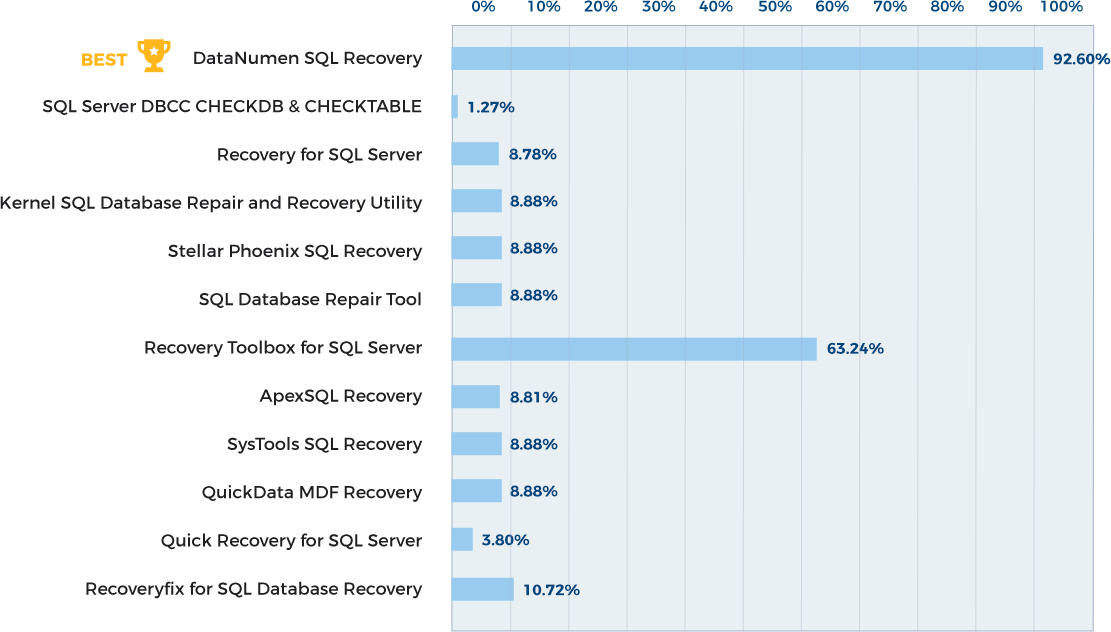
Learn more about how DataNumen SQL Recovery smokes the competition
Our Customers' Testimonials

Simon
CDE Systems Ltd
Sheffield, United Kingdom
May 15, 2023
Our database contains not only the MDF file, but also many NDF files. Your SQL database recovery tool is able to restore SQL data among all these
Our database contains not only the MDF file, but also many NDF files. Your SQL database recovery tool is able to restore SQL data among all these files. Perfect work!
Torill Pettersen
Norway
October 22th, 2021
This SQL database repair tool helps to reduce the data loss greatly! We have a huge SQL database file which is about 700GB. Yesterday it cannot be
This SQL database repair tool helps to reduce the data loss greatly! We have a huge SQL database file which is about 700GB. Yesterday it cannot be opened any more. With this piece of software, we are able to retrieve most of the data back!
Jude Elwes
United Kingdom
April 9th, 2019
The best SQL database recovery software I have ever used.
The main disadvantages are its high price and slow recovery speed. Anyway, as long as it
The best SQL database recovery software I have ever used.
The main disadvantages are its high price and slow recovery speed. Anyway, as long as it can recover the important data, these drawbacks are acceptable.
Hwan Moon
South Korea
June 6th, 2021
It takes several days for this piece of SQL repair software to complete the repair process. Anyway, finally, it brings back most of our data.
Pelagia Jaskulski
Poland
February 16, 2019
I tried many SQL repair tools. Yours is the only one that works for my file.
Thanks a lot!
Marius Kohler
German
August 10, 2018
Simply effective, which means wonderful. Thank you a lot, especially because otherwise I would have been unable to physically get the files I had to
Simply effective, which means wonderful. Thank you a lot, especially because otherwise I would have been unable to physically get the files I had to recover, due to the current lockdown to contain covid-19. I will spread a very good word of mouth about you.
Simone Valtorta
Milan, Italy
March 16th, 2020
Good Morning. I am testing your software to repair sql database. After running your tools I am now able to see all my data again :)
William Stanford
December 13th, 2019
GREAT APP! SO NICE! THANKS A LOT.
U Myo Naing Oo
September 2nd, 2019
Seamless recovery. Very Good
Nelson Fernandes
Ambernath, India
January 15, 2020
Great piece of software. Does exactly what it says, and in a very user friendly way...
Ricardo Freitas
Architect
Regional Government
Funchal, Portugal
July 27, 2019
Super tool and works very well. Database recovery tool
Mandip Kanjiya
CEO & Founder of Hey Flyer
http://www.heyflyer.com/
February 11, 2020
Extremely Simple Interface
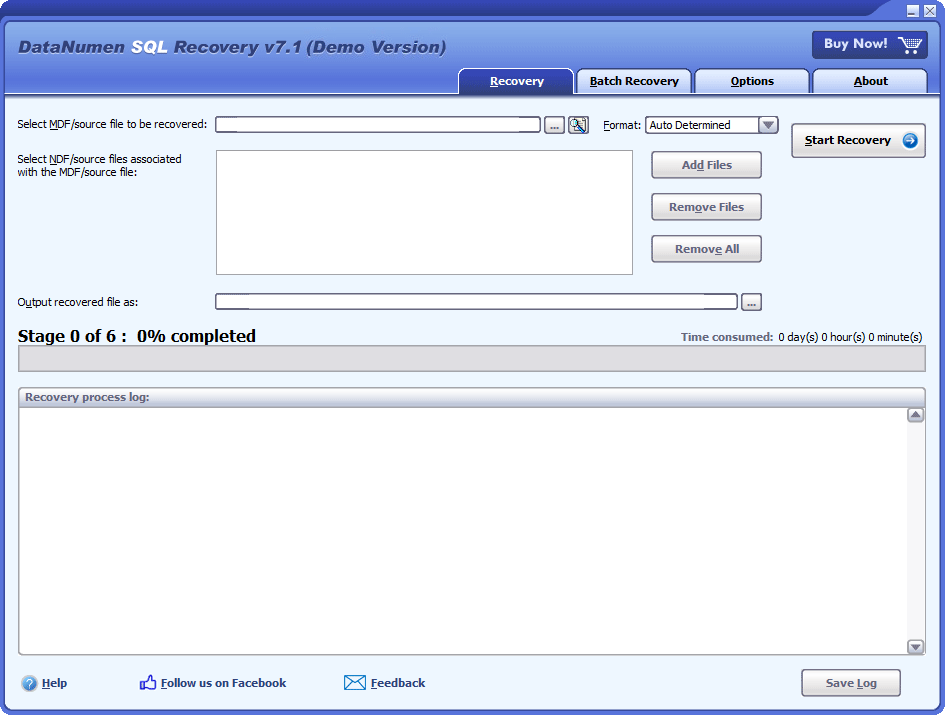
Recovery
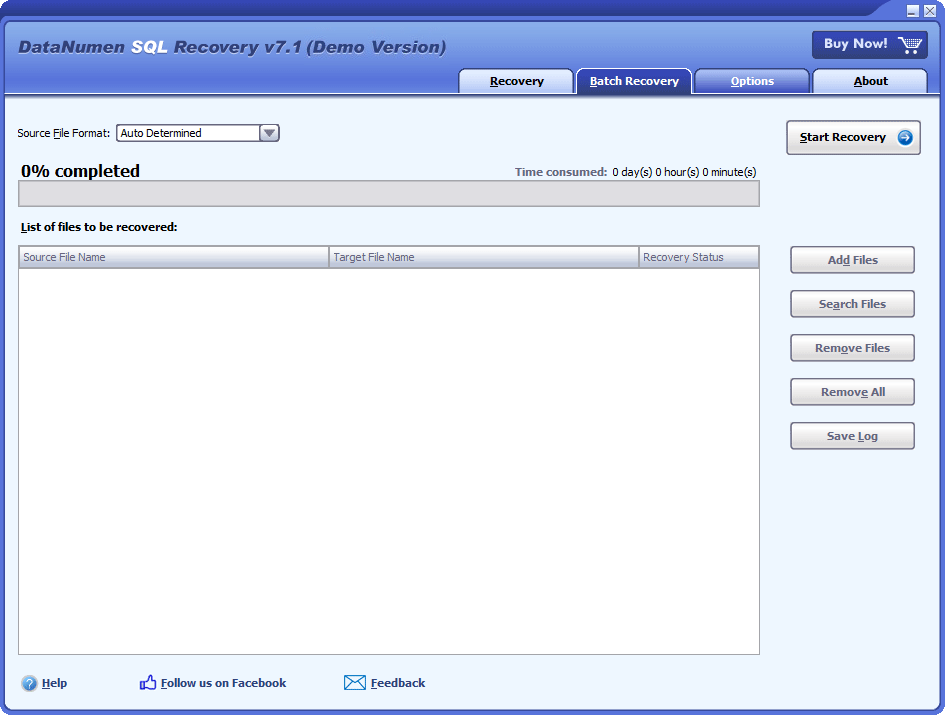
Batch Recovery
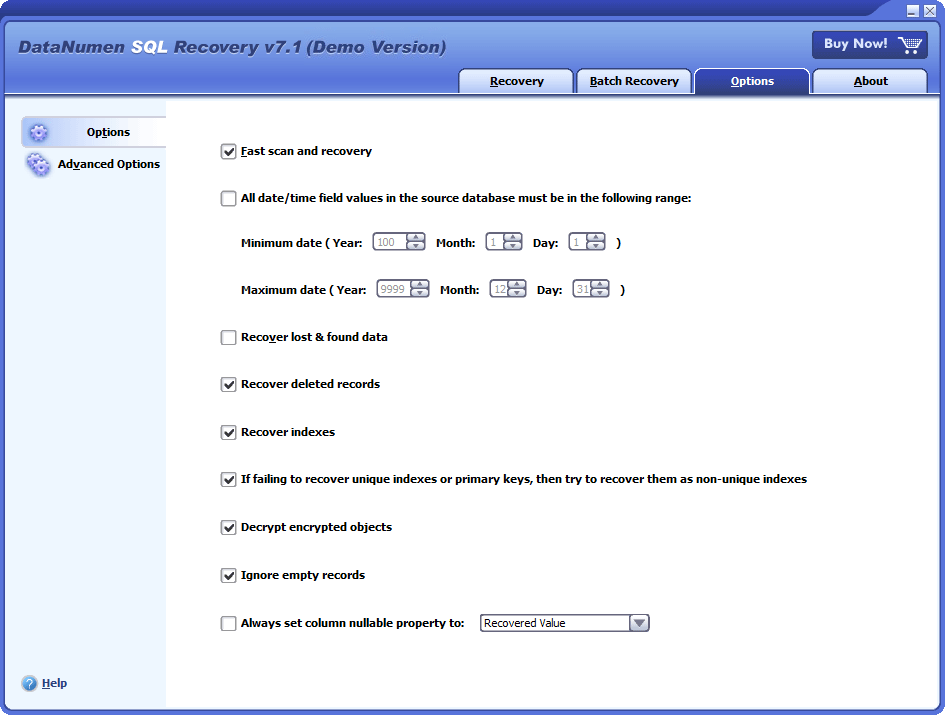
Options
Solution for Following Common Errors and Problems in SQL Server Database File

- xxx.mdf Is Not A Primary Database File
- xxx.mdf Is Not a Valid Database File Header
- Sql Server Detected A Logical Consistency-Based I/O Error: Incorrect Checksum
- Sql Server Detected A Logical Consistency-Based I/O Error: Torn Page
- Recover Delete Records or Tables in Database
Free Download20+ Years Of Experience
Buy Now100% Satisfaction Guarantee
Main Features
- Support Microsoft SQL Server 2005, 2008, 2008 R2, 2012, 2014, 2016, 2017, 2019, 2022.
- Recover the schema/structure and data in the tables.
- Recover all data types, including ASCII and Unicode XML data type.
- Recover sparse column.
- Recover deleted records in the database tables.
- Recover indexes and primary keys.
- Recover SQL database objects, including views, triggers, rules and defaults.
- Recover stored procedures, scalar functions, inline table-valued functions, and multistatement table-valued functions.
- Recover and decrypt encrypted objects in SQL Server databases.
- Recover the MDF file (primary data file) and the NDF files (secondary data files).
- Recover MS SQL Server database without an LDF file (transaction log file).
- Recover MDF/NDF data from undamaged or damaged VMWare VMDK(Virtual Machine Disk) files(*.vmdk), Virtual PC VHD(Virtual Hard Disk) files(*.vhd), Acronis True Image files(*.tib), Norton Ghost files(*.gho, *.v2i), Windows NTBackup files(*.bkf), ISO image files(*.iso) and Nero image files(*.nrg), with advanced algorithms.
- Recover SQL Server data from temporary tempdb.mdf file.
Free Download20+ Years Of Experience
Buy Now100% Satisfaction Guarantee
Recover Damaged SQL Server Databases with DataNumen SQL Recovery
Launch DataNumen SQL Recovery.
Attention: Shut down other apps that could alter the MDF file before you start.
Choose the file that you would like to repair, by entering the MDF file name or clicking the  button. Also, you can use the
  button to search for it.

In case there is one or multiple NDF files associated with the damaged MDF file, add them as well:

Specify the format of the source database file if you know it:
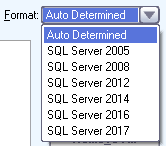
If you do not specify the format, then DataNumen SQL Recovery will try to analyze the source file to detect the format.
By default, DataNumen SQL Recovery will save the recovered data into a new file xxxx_fixed.mdf. xxxx represents the source file name. So, if the source file was MySQLDB.mdf, the recovered file would be MySQLDB_fixed.mdf. You can also rename it:

You can enter the name directly. Or, hit the button to set it. Make sure there is enough disk space for it. You can estimate the required space based on the size of the source file.
Click the  button and DataNumen SQL Recovery will prompt a "Connect to SQL Server" dialog box, as it needs to connect to a SQL Server instance to perform the recovery:
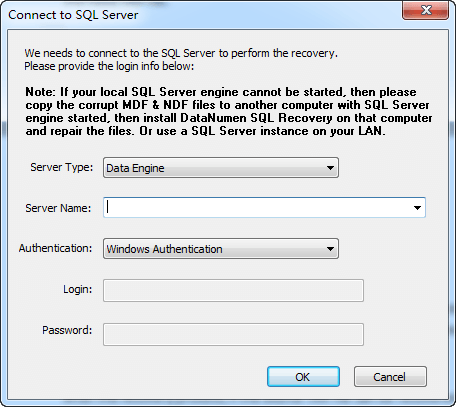
Set the Server Name and Authentication for the SQL Server instance on the local or remote computer. Then, click the "OK" button. Our MDF recovery software will try to detect the collation of the source database, and then set the destination database collation accordingly. If it cannot detect the collation, it will ask you to set it. Then it will scan the entire database, repair the MDF file, and recover data with special algorithms.
The bar displays the progress of the data recovery process:

Once the process is complete, you will see a notification like this if it was possible to recover the original MDF file:

Start Microsoft SQL Server Management Studio to access the recovered SQL Server database.
More Information


Merck Rescued Essential Data Using DataNumen SQL Recovery: A Case Study
Avery Restored SQL Server Databases with DataNumen SQL Recovery: A Case Study
Where can I find the recovered data?
The recovered data are output to a new database in the SQL Server instance you connect to when starting the SQL MDF recovery process.
The MDF file name of the output database is specified before you start the recovery.
Normally, you do not need to access the SQL database MDF file directly. After the recovery process, to access the recovered data, please do as follows:
- Start SQL Server Management Studio.
- Connect to the SQL Server instance which is same as the one you used to recover your corrupt database.
- After connection, click the instance.
- Then click Databases node.
- Then you will find one or some databases called “Database_Recovered_On_yyyy_mm_dd_hh_mm_ss_#”, where yyyy, mm, dd, hh, mm, ss is the time when the database is created, i.e., year, month, day, hour, minute and second. And # is a sequence number starting from 1. This information can easily help you identify the database generated from the latest recovery process.
- Click the node of the database you identify. You can then access all the recovered SQL database objects. For example, under Tables node, you can see all recovered database tables, including the schemas and the records.
How to reduce data loss during a SQL Server data disaster?
It is recommended to prepare a disaster recovery (DR) plan for your SQL Server instance, which normally includes:
- Routinely backup your SQL Server data.
- Have a professional SQL recovery tool such as DataNumen SQL Recovery on hand. Thus when you encounter SQL database corruption, you can use it to repair corrupt files and recover your data as soon as possible.
- Utilize the high availability features in SQL Server.
What are your product’s advantages over other MS SQL database recovery tools?
You can find a complete competitive comparison of our product with other MS SQL database recovery tools in the market.
Can I pause/resume the SQL database repair process?
That is not possible. If a repair process has been started, then you can either abort it or let it complete. Later if you want to re-repair the same SQL database file, then you need to re-start the repair process from the beginning.
However, during the repair process, you can see the recovered data in SQL Server management studio at the same time. If you think all the wanted data are recovered, then you can abort the repair process to save your time, without damaging the output database.
I only have the SQL MDF file, the transaction log (LDF) file is lost. What to do?
DataNumen SQL Recovery can recover your data from corrupt MDF file without the transaction log (LDF) file. So if your transaction log file is lost, that will not be a problem.
Do you support to recover data record in XML type?
Yes, our SQL database recovery software supports to recover records in both ASCII and Unicode XML data types.
Do I need to be an database administrator (DBA) to perform the recovery?
Yes, you need to be the database administrator (DBA), or at least get the following information from the database administrator (DBA):
- SQL Server instance name(Server Name)
- Authentication of the SQL Server instance.
Thus you can use this information to connect to the SQL Server instance and perform the recovery.
Does Microsoft SQL Server has a built-in tool to recover a corrupt database?
Yes, they do have the built-in dbcc commands, i.e., dbcc checkdb and dbcc checktable, which can check table schemas and records, then fix minor issues in your corrupt database or database tables. However, these tools only work for a very limited number of cases. If they cannot repair MDF file corruption, then you’d better to try DataNumen SQL Recovery, which works much more better.
Some of the basic usages of dbcc checkdb are listed below:
| Command | Usage |
| dbcc checkdb(‘MyDB.mdf’) | Check if MyDB.mdf has any issues. |
| dbcc checkdb(‘MyDB.mdf’, REPAIR_ALLOW_DATA_LOSS) | Check MyDB.mdf. If there are any issues, repair MDF database file, which may cause data losses. |
| dbcc checkdb(‘MyDB.mdf’, REPAIR_REBUILD) | Check MyDB.mdf. If there are any issues, repair MDF database file, which will NOT cause data losses, but may take more time. |
Some of the basic usages of dbcc checktable are listed below:
| Command | Usage |
| dbcc checktable(‘MyDB.MyTable’) | Check if MyTable in MyDB has any issues. |
| dbcc checktable(‘MyDB.MyTable’, REPAIR_ALLOW_DATA_LOSS) | Check MyTable in MyDB. If there are any issues, repair the table, which may cause data losses. |
| dbcc checktable(‘MyDB.MyTable’, REPAIR_REBUILD) | Check MyTable in MyDB. If there are any issues, repair the table, which will NOT cause data losses, but may take more time. |
How much disk space do I need prepare for the output database?
First, you need to calculate the total size of the source data, including the SQL database MDF file and all the associated NDF files. Assuming that is SDataSize.
Then, based on the SDataSize, you should prepare at least 2 * (SDataSize * 110%) for the output database on your desired location, including both the SQL MDF file and the LDF file.
Why my SQL Server database gets corrupt?
There are many reasons that may cause SQL database corruption, including:
- Hardware reasons: such as power failure, bad sectors on disks, hard disk failures, unexpected system shutdown, etc.
- Software reasons: such as software defects, virus infections, ransomware attacks, backup failure, invalid database file header, etc.
DataNumen SQL Recovery is able to recover data for all the above cases.
What is the format of the recovered files?
DataNumen SQL Recovery will connect to SQL Server instance and utilize it to generate the recovered database. So the format of the recovered files is same as the SQL Server version of the instance you connect to when performing the recovery. For example, if you connect to SQL Server 2000 instance, then the output database will also be in SQL Server 2000 format.
Which versions of SQL server are supported?
DataNumen SQL Recovery support to recover SQL databases created by the following versions of MS SQL Server: SQL Server 2005, 2008, 2008 R2, 2012, 2014, 2016, 2017, 2019.
It can connect to the following versions of SQL Server instances to generate the fixed database: SQL Server 2000, 2005, 2008, 2008 R2, 2012, 2014, 2016, 2017, 2019. The fixed database will be saved in the version same as that of the SQL Server instance.
Can you output the recovered database as a SQL script?
The earlier versions of DataNumen SQL Recovery support such a feature. However, we have removed this feature in the recent versions.
Do you support to recover indexes and other objects?
Yes, indexes, primary keys, views, triggers, rules, defaults, stored procedures, and other objects are supported.
I fail to recover SQL database with your file recovery tool. Please help.
Please contact us and provide the recovery log. You can find more details on how to get the recovery log.
Sometimes, due to the data disaster, the MDF file and NDF files may not contain the actual SQL data. But the disk or drive where you have stored the MDF or NDF files may still contain recoverable data. You can recover your data from the disk or drive directly.
Can I save the recovered database into multiple data files?
Sorry but currently our corrupt SQL database recovery tool does not support to save the recovered database into multiple data files, i.e., one primary data file (MDF) and several secondary data files (NDF).
However, after the SQL MDF recovery process is completed, you can do as follows to implement your goal:
- Start SQL Server management studio.
- Create a new database and design the files and filegroups based on your requirements, such as spread data across several files.
- Clone the recovered database from the recovered database to the new database created in step 2. Alternatively, you can also export the recovered database as a SQL script, and then import the script back to the new database.
What are the limitations of the demo version?
The demo version uses the same data recovery engine as the full version, except that it will insert demo texts in some of the fields in the recovered database.
Can you recover the table schema only?
Our SQL database recovery software will recover the entire database, including tables and all other objects. For tables, both the table schema and the table record data will be recovered. It is not possible to recover the table schema only.
Which versions of Windows are supported?
Currently, Windows 95/98/ME/NT/2000/XP/Vista/7/8/8.1/10/11 and Windows Server 2003/2008/2012/2016/2019 operating systems are supported. Also, both 32bit and 64bit systems are supported.
Can you output the database as one MDF and multiple NDF files?
Sorry but currently we only support to output a single SQL MDF file.
Your file recovery tool shows an error when recovering an index. How to solve the problem?
Some indexes have some special constraints, such as unique, while the recovered data may not meet these constraints. After the SQL MDF recovery process, you can do as follows to solve the issue:
- Remove some redundant data to make sure the remaining data meet the constraints. Then rebuilt the index manually.
or
2. Remove some constraints in the index and rebuild it manually.
You can do both 1 and 2 with SQL scripts.
I only have the corrupted MDF file. The associated NDF files are missing. Can you recover the data?
Yes, even if you only have the primary database file, our MDF recovery software can still recover data for you. However, only those in the MDF file can be recovered. Those in the NDF files are beyond recovery since you do not have the NDF files.
Can you recover encrypted objects?
Yes, we can. And the encrypted objects, such as stored procedures, will be recovered and saved as decrypted versions.
Can you recover deleted records?
Yes, by default, our file recovery tool will recover deleted records. You can also change the option, as follows:
- Start our SQL MDF recovery tool.
- Click “Options” tab.
- Check/Uncheck the “Recover deleted records” option accordingly.
- Repair MDF files.
What if I don’t know the version of the SQL Server database?
No worries. Our MDF recovery software will auto-detect the version for you, before it starts to repair corrupt databases.
Can you output the recovered data as .CSV files?
Sorry but currently our SQL database MDF recovery software does not support to do so. But you can export your table to .CSV files in SQL Server Management Studio directly.
How long can I use the full version?
The license for the full version is perpetual. You can use it forever and for unlimited times.
What are the consequences of SQL database corruption?
There are many:
- Data losses.
- Performance degrades.
- Some operations may fail. Such as backup, replicate, etc.
How to detect MDF file corruption?
If you encounter any of the problems in the list, then your MDF file is corrupt. Moreover, you can also use the following command to detect the MDF file corruption:
SELECT * FROM msdb..suspect_pages WHERE (event_type = 1);
Different event types correspond to different errors, as below:
| Event type | Error |
| 1 | 823 or 824 error |
| 2 | Bad checksum |
| 3 | Torn page |
Note the above command can only detect minor corruptions in MDF files.
Can you recover MDF files attacked by Ransomware?
Ransomware is a kind of malware. It will encrypt your MDF database files. You need to pay the creator of the Ransomware to decrypt your database and get back your data.
Fortunately, our SQL database recovery software can recover data from MDF files infected by Ransomware.
Related Products
DataNumen Database Recovery
Database recovery suite, including recovery tools for corrupt Microsoft Access databases and DBF databases.
Details
DataNumen Access Repair
Repair and recover corrupt Microsoft Access databases (.mdb and .accdb files).
Details DataNumen SQL Recovery